You spent 40 minutes in Photoshop trying to paste a friend's face onto a movie poster. The skin tones are off, the edges look painted-on, and the lighting makes no sense. Sound familiar? The good news: AI has quietly made that whole process almost automatic.
AI face swap is a technique that uses machine learning models to detect, map, and transplant one person's face onto another image or video — automatically matching skin tone, lighting angle, and facial contours. Platforms like Framia Pro track these tools as they evolve, and in 2026 the quality gap between a manual Photoshop job and an AI-generated swap is enormous. Here's a plain-English guide to getting your first result in under five minutes.
How Does the AI Actually Find a Face?
Think of the AI as a very fast puzzle-piece matcher. Before it swaps anything, the model runs face detection — scanning the image for eyes, nose, mouth, and the geometric distances between them. It builds a mesh of roughly 68 landmark points that defines the unique "shape" of a face.
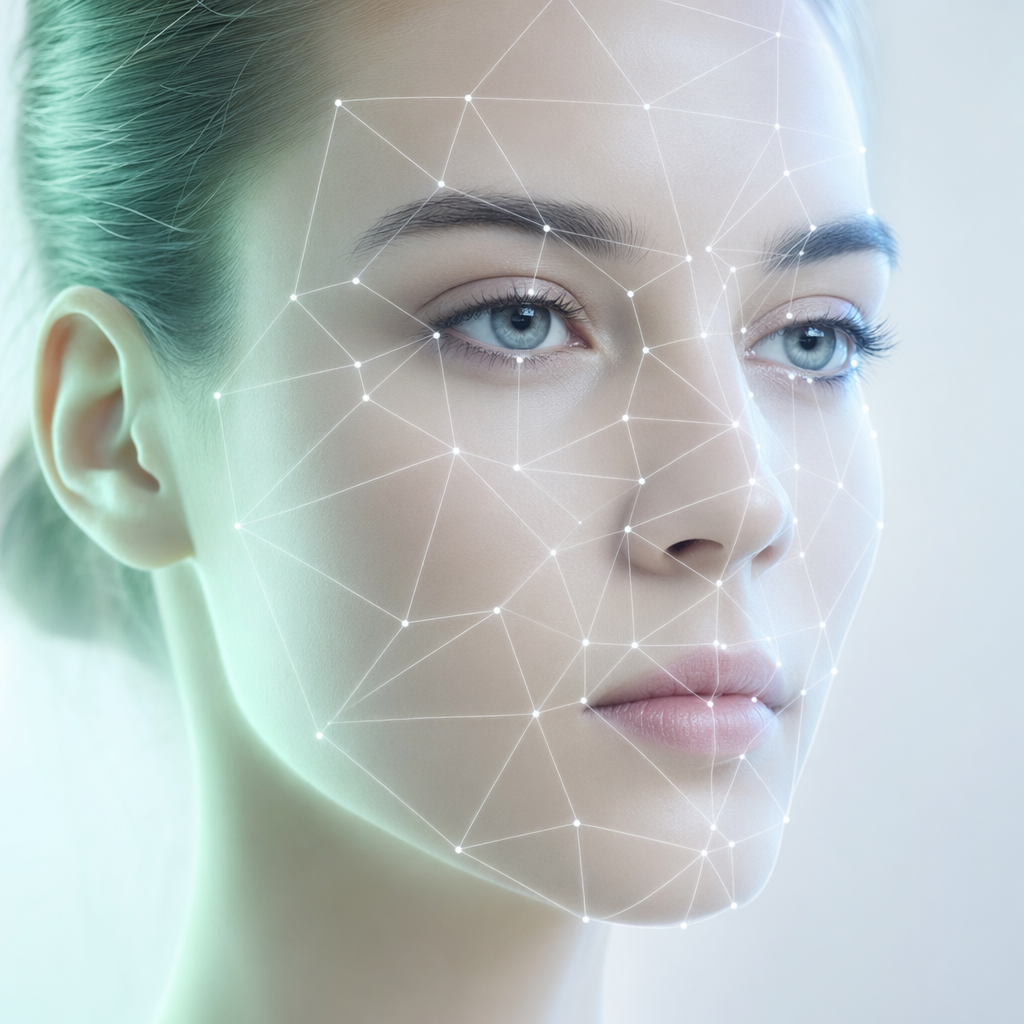
That mesh is then used to warp and blend the source face (the face you're transplanting) so it fits the target shape naturally. This is why a good AI swap handles head tilts and slight angles well: the model isn't just copying pixels, it's warping a 3D-approximated surface onto the destination geometry.
Most web-based tools handle this step invisibly. You upload two images — done. But knowing it's happening explains why front-facing, well-lit source photos always produce better results than blurry side-shots.
Why Your Source Photo Matters More Than the Tool
Here's the part most tutorials skip: the swap is only as good as the photo you feed it. Think of it like cooking — you can have the best oven in the world, but if the ingredients are poor, the dish suffers.
For a photo face swap, the ideal source image is:
- Front-facing or close to it (within ±30 degrees of center)
- Well-lit with even, diffused light — harsh shadows create blend artifacts
- High resolution — at least 512×512 pixels on the face region alone
- Single face only — if your source photo has multiple people, some tools struggle to know which face to grab
For a video swap, consistency across frames is what matters most. A source photo taken in flat, even lighting will "hold" better across camera motion than a dramatic, directional-lit portrait.
Tool Comparison: 7 Options from Free to Pro
| Tool | Photo Swap | Video Swap | Free Tier | Starting Price | Best For |
|---|---|---|---|---|---|
| Magic Hour | ✅ | ✅ | ✅ 5/day | $9.99/month | All-round quality |
| Reface | ✅ | ✅ | ✅ (watermark) | $3.99/month | Mobile, casual use |
| Akool | ✅ | ✅ | ✅ limited | $30/month | Business avatars |
| FaceSwapper.ai | ✅ | ❌ | ✅ unlimited* | $9.99/month | Quick photo swaps |
| DeepSwap | ✅ | ✅ | ❌ | Pay-per-use | Production quality |
| Pica AI | ✅ | ✅ | ✅ limited | $8/month | Style-aware blending |
| FaceFusion | ✅ | ✅ | ✅ (local) | Free | Privacy-first / dev |
*FaceSwapper.ai free tier processes at lower resolution.
Step-by-Step: Your First AI Face Swap
Step 1 — Choose the right tool for your goal
If you want a quick photo swap and have no budget, start with Magic Hour's free plan (5 photo swaps per day, no watermark on photos, as of May 2026) or FaceSwapper.ai. If you need video output, Magic Hour or DeepSwap are the most reliable options for beginners.
Step 2 — Prepare your source face photo
Select a photo where your subject is looking directly at the camera, the face fills at least one-third of the frame, and the lighting is soft and even. A phone selfie taken near a window on a cloudy day works perfectly. Avoid glasses, heavy shadows, and anything covering the chin or forehead.
Step 3 — Select (or upload) your target
The "target" is the image or video where the face will be placed. Most browser-based tools let you either upload your own file or pick from a library of templates. For your first attempt, use a well-lit talking-head video clip — these produce the most consistent results.
Step 4 — Run the swap and review at full resolution
Click generate, then wait. Processing times range from a few seconds (photo) to several minutes (video). When it's done, download the full-resolution file before judging quality — browser previews are often compressed and show the result at lower quality than what you'll actually export.
Step 5 — Refine if needed
If the skin tone feels slightly off, most tools let you adjust brightness or run the swap again with a different source crop. Cropping tighter on the face (cutting off the neck) often improves blending. For video, check the clip at 2x speed to quickly spot any "flickering" frames that need addressing.
Where Framia Pro Fits In
When you're evaluating which AI face swap tool to commit to, the sheer number of options can feel paralyzing. That's where Framia Pro comes in. It's a directory and tutorial site built for creators, developers, and marketers who want a practical shortcut through the AI tool landscape. Framia Pro indexes face swap tools, video generators, image editors, and writing assistants — with filters for free tier availability, platform (web, iOS, Android, API), and use case. The site covers new model releases as they drop, so you don't have to trawl through press releases to find out whether the tool you chose last month has been quietly updated or superseded. If you're starting from scratch, the Framia Pro tool pages give you a side-by-side view of what each option actually does, making the Step 1 "choose the right tool" decision a lot faster.
Common Mistakes Beginners Make
Using a celebrity photo as the source. Some tools have content filters that reject known public figures. Use a photo of yourself or a willing participant.
Expecting perfection on the first try. Face swap quality depends heavily on how similar the source and target face shapes are. A narrow face transplanted onto a wide jawline needs more post-processing.
Skipping the full-resolution download. Browser preview quality is misleading. Always download and view the output at 100% zoom before deciding whether to re-run.
Ignoring consent. Only swap faces of people who have explicitly agreed. Most tools' terms of service require this, and in many jurisdictions, creating non-consensual synthetic media is illegal.
FAQ
Do I need a powerful computer to do an AI face swap?
No. All of the web-based tools in the table above run their AI processing in the cloud, so your laptop's CPU or GPU doesn't matter. You just need a decent internet connection. The exception is FaceFusion, which is open-source software you run locally and does require a GPU for reasonable speed.
How long does an AI face swap take?
For a single photo, most cloud tools return results in 3–15 seconds. For a 30-second video clip, expect 1–5 minutes depending on resolution. Longer clips and higher resolutions take proportionally more time. Paid tiers generally process faster than free tiers due to priority queue access.
Can AI face swap tools handle glasses or beards?
Most modern tools handle light facial hair and thin-frame glasses reasonably well. Heavy beards and thick-framed glasses that cover significant portions of the face reduce accuracy, since the landmark detection has fewer reference points to anchor on. For best results, use a source photo where the face is unobstructed.
Is there a free AI face swap tool that doesn't add a watermark?
Magic Hour's photo face swap is watermark-free on the free tier (5 per day, as of May 2026). For video, watermark-free output typically requires a paid plan. FaceFusion running locally produces watermark-free results at no cost, but requires technical setup.
Are AI face swaps legal?
Creating AI face swaps of yourself is legal in most countries. Swapping someone else's face without their consent is legally risky and potentially illegal — especially if the result could be mistaken for reality or used to defame. The EU AI Act (Article 50, effective August 2026) requires that AI-generated synthetic media be machine-readable marked. Always use these tools responsibly and within the platform's terms of service.
What You've Learned
Forty minutes in Photoshop. That's what AI face swap replaces — and does it dramatically better. With the right source photo and a free tool like Magic Hour, you can get a convincing result in under five minutes. The difference between a good swap and a bad one usually comes down to source photo quality and whether you reviewed the output at full resolution.
Curious about what other AI tools have reached a similar "good enough for most people" threshold? Framia Pro keeps a running index of the ones worth your time — no hype, just what works.