A marketing manager overseeing four client accounts once told us her biggest weekly time sink wasn't writing captions — it was rebuilding the same Story layout from scratch for every brand, because nothing was saved as a reusable template. That's a template problem, not a creativity problem — and it's why B2B teams are increasingly pairing static templates with an AI video generator to animate product photos instead of designing every post by hand.

Instagram Story templates for business are pre-built layouts — fixed text zones, logo placement, and color treatment — reused across posts or client accounts, swapping only the photo, video, and copy each time. A solo creator saves a few minutes per post; a team running several brand accounts keeps clients' Stories distinct and one brand's Stories consistent day to day.
The consistency problem shows up fastest in agencies. When every account manager builds their own layout, a client's feed ends up with mismatched fonts and logo placements, followers can't recognize the brand at a glance, and handing off posting duties means a re-briefing session. A documented template — saved structure, not a one-off file — fixes that by making brand identity a property of the template, not of whoever's posting.
Multi-brand teams face a related problem: one identical template across clients makes every account look interchangeable, but building from zero each time eats hours better spent on what goes in the Story. The fix most agencies land on is a shared template structure — one text zone, one logo zone, one motion zone — with brand-specific colors, fonts, and assets swapped in per account. The structure stays constant; only the dressing changes.
Here's how the common template approaches compare for a B2B or agency use case:
| Approach | Best for | Cross-brand scalability | Setup time |
|---|---|---|---|
| Manual design per post | One-off campaigns | Low | High per post |
| Shared design-tool templates (Canva-style) | Small teams, few brands | Medium | Medium |
| Structured template + AI-generated motion | Agencies, multi-brand teams | High | Medium upfront, low ongoing |
| Fully custom per-brand system | Large enterprise brand | High | High upfront |
For agencies managing several accounts, the third row tends to win: a fixed structural template combined with an AI-generated motion layer keeps output fast without making every client's Stories look like copies of each other.
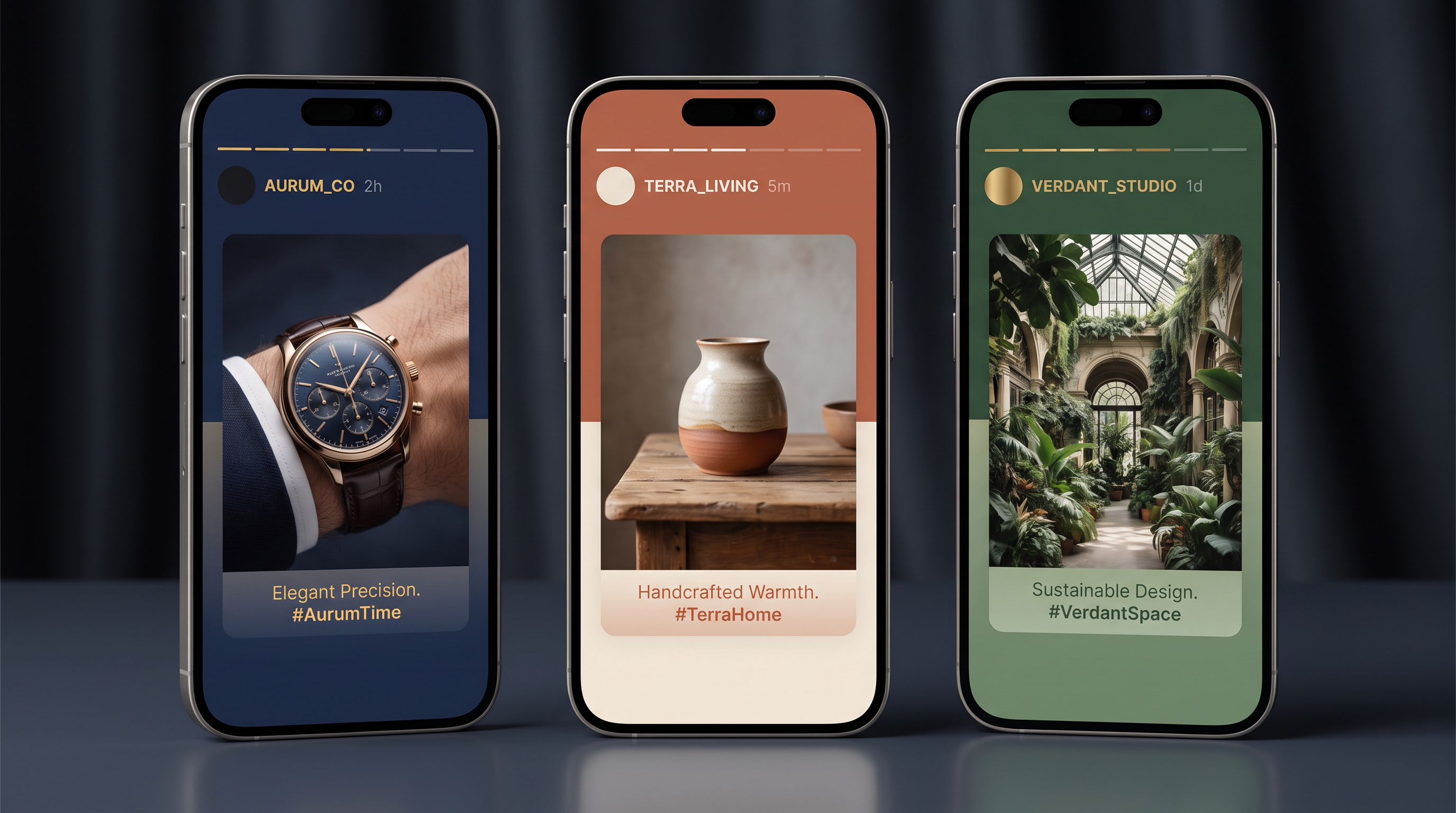
Five Instagram Story template types every B2B team should have on hand
Most B2B accounts don't need dozens of templates — they need a small set that covers the situations that come up every month. Five cover almost everything:
- Product launch. A fixed frame for the hero shot, a headline zone, and a CTA sticker slot. This is usually the first template a team builds because launches happen on a schedule and the layout rarely needs to change, only the product photo and copy.
- Promotion / discount. A bold price or percentage-off zone plus a countdown or urgency element. Because promos run frequently, this template gets reused more than any other, which makes it the highest-value one to get right once.
- Testimonial. A quote zone paired with a customer photo or logo placement. Testimonials work best animated — a quote that fades in over a customer photo reads as more credible than a static screenshot of a review.
- Event. Date, time, and location zones with a countdown sticker. Event templates get reused across a whole promotional run, so a version that already supports subtle motion (a pulsing RSVP button, a sliding date card) saves rebuild time for every reminder post.
- Behind-the-scenes. A looser, less branded frame — smaller logo, more of the raw photo or clip visible — used to humanize an account between the more polished launch and promo posts.
What ties these together is that a static template only gets a business halfway there. A product-launch template with a still photo looks like an ad; the same template with the hero shot turned into three seconds of subtle motion — a slow pan, a soft zoom, a light flicker on packaging — reads as content. That gap between "static layout" and "animated Story asset" is exactly where AI image-to-video generation earns its place in a template system: it takes the photo a client already has and turns it into the motion layer the template was designed for, without a video shoot.
Where Framia Pro fits for B2B teams
Framia Pro is an AI video generation tool built for exactly this handoff: turning a product photo, testimonial screenshot, or event graphic into a short animated clip sized for Instagram Stories, so a template's motion zone doesn't sit empty. For an agency running templates across several accounts, that means the same product-launch template can go out for Client A and Client B with different photos animated the same way — same structure, same quality bar, different brand.
Because generation quality varies by model and by the type of photo being animated, it's worth testing a template's motion zone against a client's typical product shot before running a full batch — a beauty product bottle and a SaaS dashboard screenshot don't always animate equally well on the same settings. Framia Pro is where that test happens, ahead of the actual posting workflow rather than replacing it.
A five-step way to build a reusable business template system without starting over each week:
- Separate structure from brand assets. Define one text zone, one logo zone, and one motion zone that stay fixed regardless of client — only colors, fonts, and imagery change per account.
- Batch-animate a client's photos in one sitting, not one post at a time. Turning four or five product or event photos into short clips through an AI video editor in a single session is faster than generating one clip every time a post goes out.
- Build one template per content type, not per week. The five types above — launch, promo, testimonial, event, behind-the-scenes — cover most B2B posting needs; avoid designing a new layout for every individual post.
- Review templates quarterly, not weekly. Constant redesigns undercut the consistency a template is supposed to provide; a quarterly refresh keeps things current without breaking recognizability.
- Keep a swap-ready asset folder per client. Photos, logos, and brand colors pre-sorted by account cut the actual assembly time down to minutes once the template structure exists.

This structure carries over to other platforms too, not just Instagram. The same text-zone-plus-motion-zone system usually needs light resizing rather than a full rebuild when adapted for TikTok or Reels — marketing teams juggling both formats have written up how B2B content ideas translate across social platforms in more detail.
Teams running visual content across several client accounts at once also tend to run into the same image-generation consistency question — worth reading about how agencies handle AI image generation for marketing teams if Stories are only one piece of a broader content workload.

That marketing manager's four-client problem wasn't solved by a prettier template — it was solved by separating the fixed structure from the per-client assets, then batching the photo-to-video step instead of animating one clip at a time. That's the difference between a template system that scales and one that collapses at the second client. Teams starting out typically run a client's existing photos through Framia Pro first, to see how the animated version looks inside the template before rolling it out account-wide.
Frequently Asked Questions
What makes a template "business-ready" versus a personal template?
A business-ready template separates fixed brand elements (logo zone, color, font) from swappable content, and is typically documented so more than one team member can use it consistently — a personal template usually lives only in one person's head or one file.
How many Instagram Story templates does a B2B team actually need?
Most B2B accounts get by with the five core types — product launch, promotion, testimonial, event, and behind-the-scenes — rather than a unique template per post.
Can one template work across multiple client brands?
The layout structure can be shared, but colors, logos, and imagery should stay brand-specific; reusing an identical visual template across unrelated clients tends to make each brand look less distinct.
How often should business Story templates be refreshed?
A quarterly review is generally enough — refreshing too often undercuts the recognizability a template is meant to build, while going a full year without updates can make a brand's Stories feel dated.
Is AI-generated video reliable enough for client-facing Story templates?
Quality varies by model and input, which is why testing a template's motion zone against a specific client's typical photo or product type before committing to a full batch is a more reliable approach than assuming every generator performs identically across every image type.